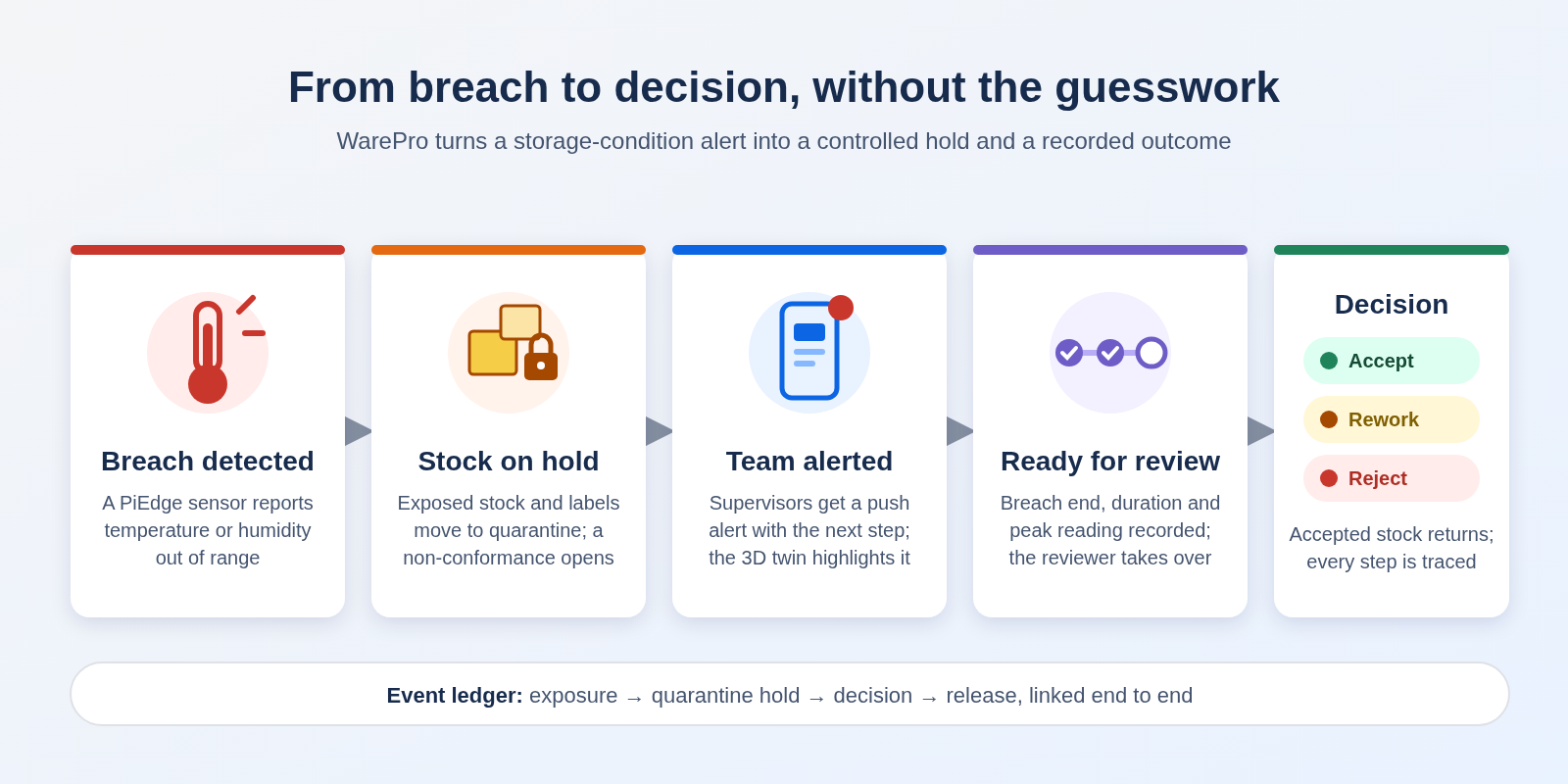
A cold room drifts out of range overnight. The sensor logs it, but nobody acts on the reading. By the morning shift, pallets from that bay are already picked, packed and on their way to a customer. The breach was recorded, but the stock was never stopped. WarePro, working with PiEdge condition monitoring, closes that gap. When a storage location goes out of range, WarePro puts the exposed stock on hold, alerts the people responsible, and leads them to a recorded decision. No one has to remember to do it.
Figure 1: The excursion flow in WarePro, from sensor breach to recorded decision.
Where the Risk Hides
In most warehouses, an excursion is handled by hand. Someone sees the alarm and makes a phone call. Someone else tapes a "do not use" sign to the rack. A quality lead starts a spreadsheet. Every step depends on a person noticing in time, and on everyone else hearing about it.
The alarm and the stock are disconnected: The sensor knows the room is too warm. The inventory system still shows the stock as available.
Signs don't stop scanners: A handheld scanner will still let a picker take a pallet with a paper notice taped to it.
Decisions go unrecorded: Which lots were released, which were reworked, who approved it and why often lives only in an email.
Audits come later: When an auditor or customer asks for the history, the team has to piece it back together from memory.
How WarePro Contains an Excursion
WarePro treats a condition breach as an inventory event as well as an alarm. The same signal that reports the breach also changes what the warehouse is allowed to do with the stock.
Automatic Detection and Hold
Excursion opened on the breach: When a PiEdge sensor reports a temperature or humidity breach, WarePro opens an excursion for the storage location that sensor monitors. Each business chooses which conditions count.
Stock captured as it was: WarePro records a snapshot of everything in that location, product by product and lot by lot, at the moment the breach began.
Moved to quarantine automatically: The exposed stock moves to the warehouse's quarantine location in one completed inventory movement. It is no longer available to allocate.
Non-conformance report raised: A non-conformance report opens alongside the excursion, so quality work starts straight away.
Held Means Held
Labels follow the stock: The mobile labels for the held stock also go into quarantine. Any scan of a held label for put-away, picking or dispatch is refused on the handheld.
Release is restricted by role: Only authorized roles can take stock out of quarantine. The rule applies whether the move is made from the desktop window, through the API or during mobile put-away.
No silent failures: If the hold cannot be completed, for example because no quarantine location is set up, WarePro still records the excursion. It flags the excursion for attention, and the hold can be retried once the issue is fixed.
Alerts That Tell People What to Do
Push alerts to supervisors: Floor supervisors get an alert on their phones when an excursion opens, and again when the breach clears and a decision is due.
The next step, stated plainly: Each alert says what to do now, such as which location is affected and who can make the decision.
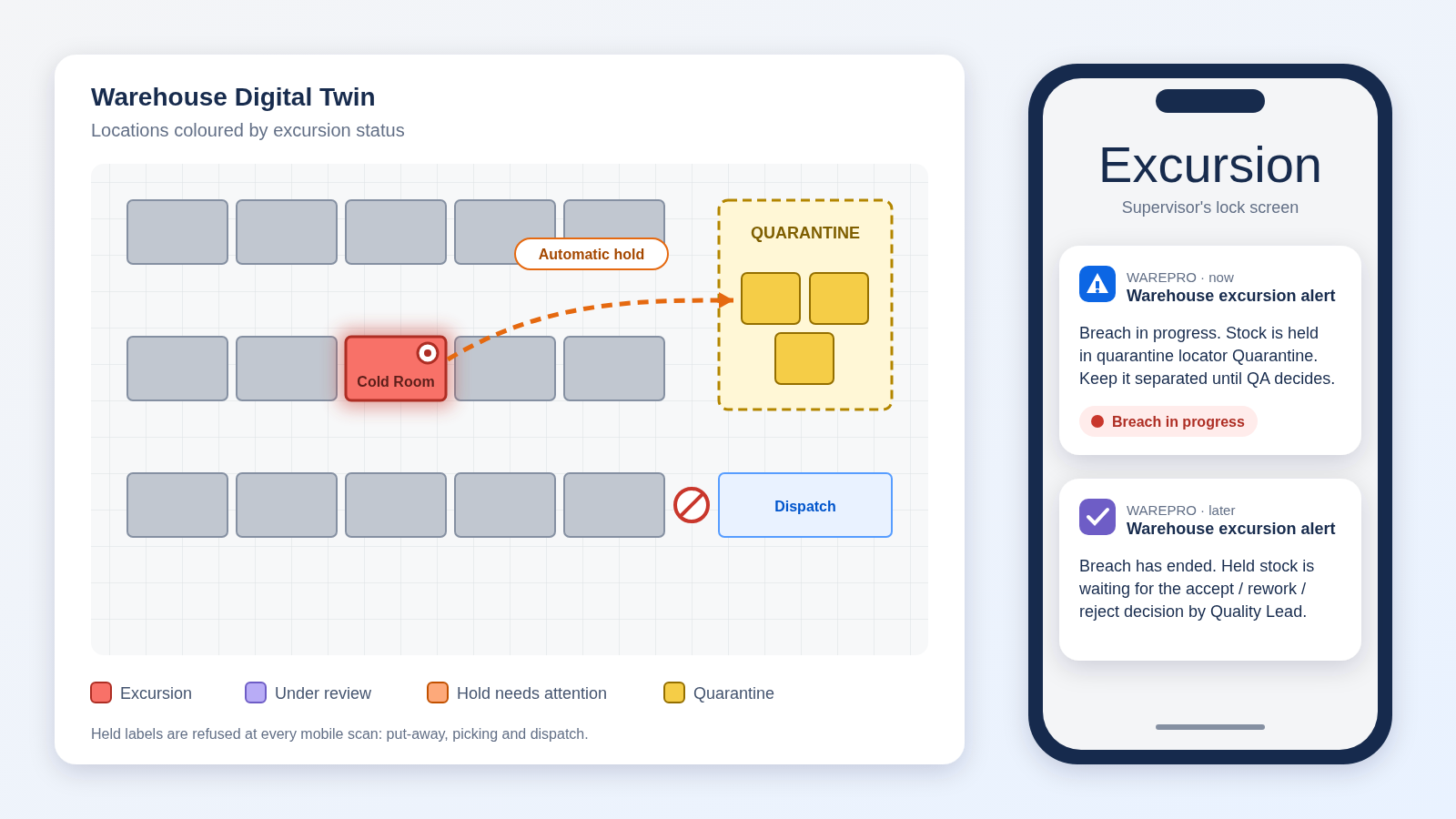
Visible on the 3D Digital Twin: Affected locations are highlighted on the warehouse's 3D Digital Twin, with distinct states for an active excursion, stock awaiting review, a hold that needs attention, and occupied quarantine.
Figure 2: An affected location and the quarantine zone on the Digital Twin, with the supervisor's alerts at the start and end of the breach.
A Clear Review and Decision
The breach, fully recorded: When conditions return to normal, WarePro records when the breach ended, how long it lasted and its peak reading. The excursion then moves to Ready for review.
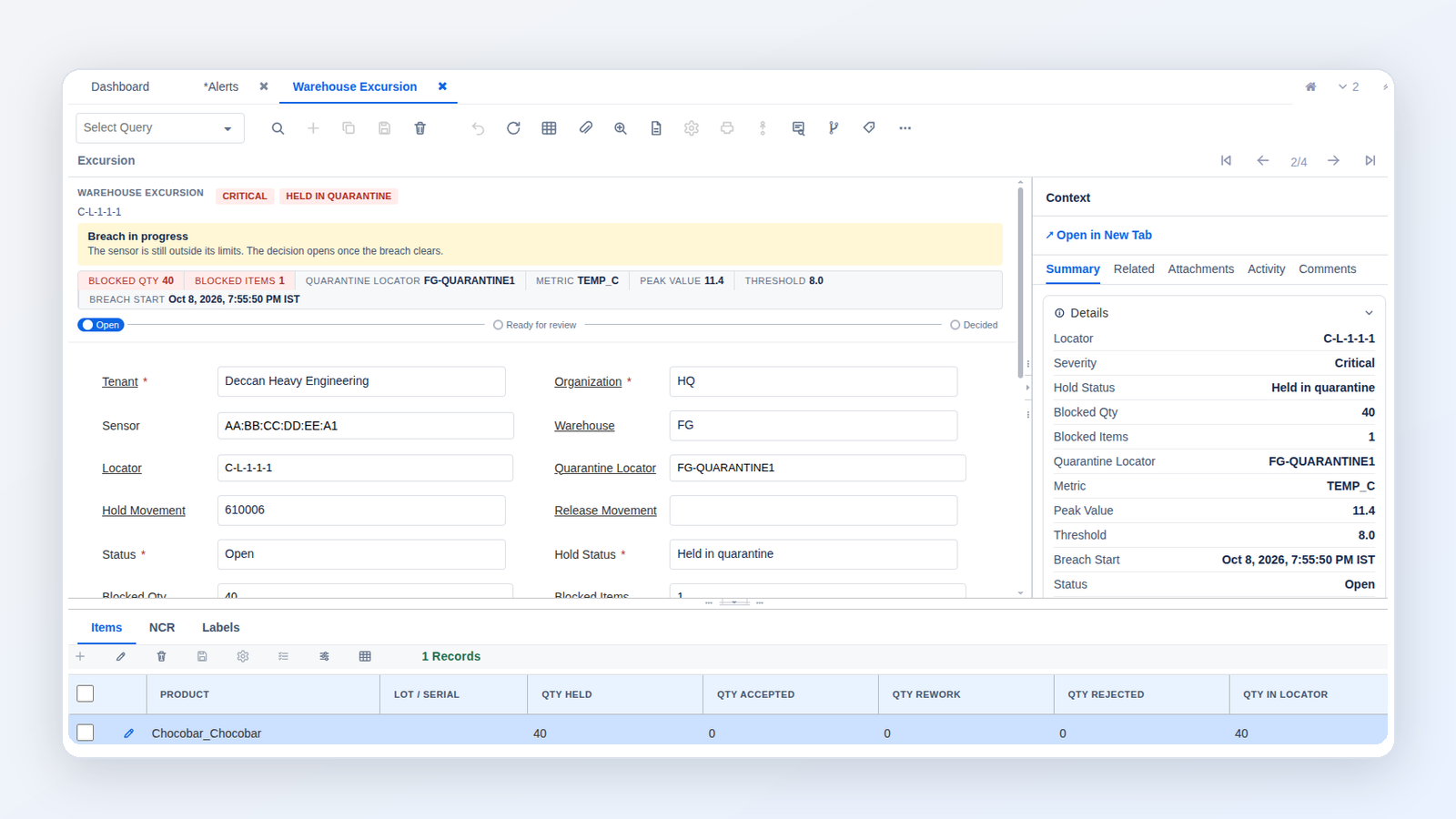
One screen for the reviewer: The excursion record shows severity, hold status, the blocked stock and a "what happens next" banner. A progress tracker moves from Open to Ready for review to Decided. Reviewers can work through excursions from a list or a board.
Decisions item by item: For each product and lot, the reviewer splits the held quantity into accept, rework and reject. Accepted stock returns to its original location, labels included. Rework and rejected stock stays in quarantine.
Closed with a summary: The non-conformance report closes with a summary of the decision, so the outcome is recorded with the event that caused it.
Figure 3: The excursion review screen, where each held lot is accepted, reworked or rejected.
What the System Does, What People Decide
WarePro handles
Your team decides
Opening the excursion when a sensor reports a breach
Which conditions should count as an excursion
Recording a snapshot of the exposed stock by product and lot
Whether each lot is accepted, reworked or rejected
Moving the stock and its labels into quarantine
Which roles are allowed to release stock
Blocking held labels at every mobile scan
What corrective action to take on the root cause
Alerting supervisors and stating the next step
When a reviewed excursion is ready to close
Returning accepted stock and closing the report with a summary
Operational Outcomes
Exposed stock stays in the building: Held stock and its labels cannot be allocated, picked or dispatched until someone with authority makes a decision.
A trace that stands up to an audit: The event ledger links each step: the exposure, the hold, the decision and the release. The history is already recorded when someone asks for it.
Faster response from the floor: Supervisors hear about an excursion as it starts, and the alert tells them what to do.
Less manual coordination: No signs, side spreadsheets or chains of phone calls. The excursion record is the single place where the work is done.
Where It Applies
Any business whose stock is sensitive to storage conditions gains from containment that doesn't depend on someone noticing in time.
Pharmaceuticals and life sciences: Temperature-controlled storage where every release decision must be traceable.
Food and cold chain: Chilled and frozen goods where exposure affects safety and shelf life.
Chemicals and specialty materials: Products with defined storage ranges for temperature or humidity.
Electronics and components: Moisture-sensitive stock that must be kept dry before use.
Turning Every Excursion into a Recorded Decision
A breach in storage conditions can't always be prevented. What matters is what happens to the stock next. WarePro links the sensor signal to the inventory, so exposed stock is held at once. The right people know what to do, and every release is recorded with the decision behind it. The excursion process becomes repeatable and visible, ready for audit.
Ready to stop exposed stock before it ships?
See WarePro excursion control in action, from the first sensor alert to the final decision. We'll show you how it fits your warehouse, your storage zones and your quality process.