
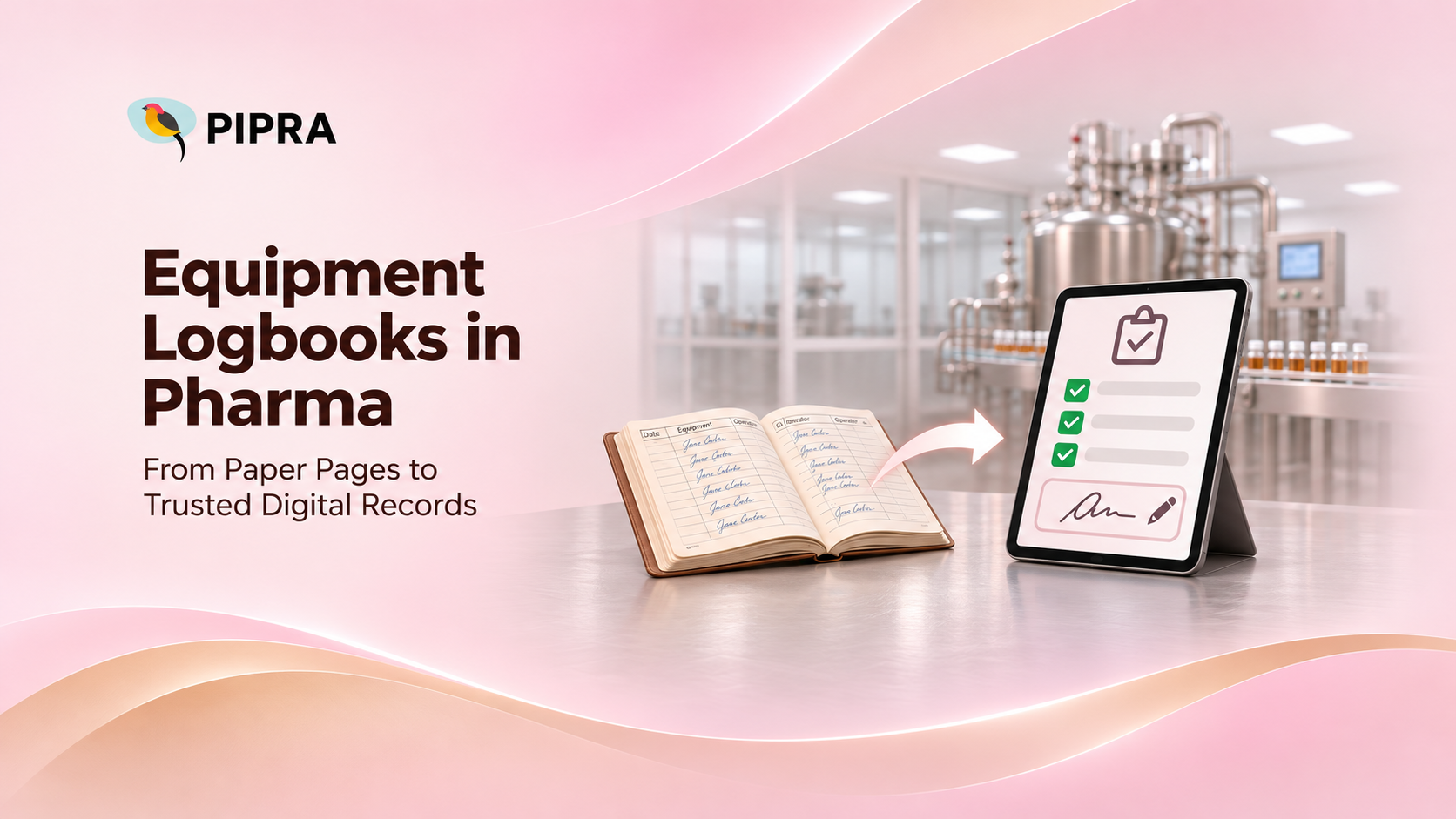
Walk onto any pharma production floor and you will find them hanging next to the machines: bound logbooks, one per mixer, filler, packaging line and room. Every cleaning, every batch, every breakdown is written in by hand and signed. When an inspector wants to know what happened to a batch, these books are where the answer starts.
They are also where many of the findings start. This post covers what the regulations ask of an equipment logbook, where paper falls short, what an electronic logbook has to do to be better than paper rather than just faster, and how PIPRA One does it today.
Two texts set the bar.
Read together, a logbook entry must say what was done, to which equipment, for which product and batch, when, and by whom, with a second person checking the critical work, in an order nobody can rearrange. Data-integrity guidance adds the familiar ALCOA principles: attributable, legible, contemporaneous, original and accurate.
Paper logbooks are not wrong. They are just easy to get wrong, and hard to check.
Scanning paper pages into a PDF solves none of this. An electronic logbook earns its place when it does what paper cannot:
Every stage of a solid-dose plant keeps logbooks: the balances in dispensing, the mixer, the capsule filler, the packaging line, the instruments in the QC lab, and the rooms they stand in. The eLogbook keeps all of them, and each entry it records changes what the plant knows: whether the equipment is clean, which batch it ran, what maintenance has to do, and what QA still has to check.
Where the eLogbook sits in a pharma plant
Every stage keeps logbooks for its equipment, lines, rooms and instruments; the eLogbook keeps them all, signed
On the floor
Use
Clean
Maintain
Check
Correct
Every entry: the server's time · signed with the person's own password · verified by a second person where required
Entry types and checks are set up per site from its own SOPs; the ones shown are the demo plant's.
Where the eLogbook sits in a pharma plant: every stage writes to it; it records use, cleaning, maintenance, checks and corrections; it feeds equipment status, batch evidence, maintenance and QA review
PIPRA One's eLogbook keeps a logbook for every asset in its maintenance register: equipment, production lines, rooms and instruments. Operators record entries on PiGo, the mobile app, at the machine; QA and supervisors review on PiGo or on the web. It is not a separate system bolted on: it works on the same assets as Pi MRO (maintenance), the same batches as Nija (traceability) and the same lots as WarePro (warehouse), and writes every signature to the platform's event ledger.
The eLogbook in PIPRA One
Same assets, batches and lots as the other products; every signature on the event ledger and anchored on a shared one
Room conditions on the same timeline
A logbook for each asset in the register; breakdowns become maintenance requests
Status rules, checks and limits, password signatures, second-person verification, hash chain
Usage names the batch Nija tracks; the product follows from the batch
Entries carry the batch's lot, so the trace joins its stock moves
The eLogbook in PIPRA One: it works with Pi MRO, Nija and WarePro and writes every signature to the shared event ledger, read by Trace Explorer, the status board and the chain check
The eLogbook comes with Pi MRO Core and Nija Core. Raising maintenance requests from breakdowns, the chain check and hold-time watching come with Pi MRO Control. Anchoring signatures on the shared ledger comes with Nija Edge.
Each kind of entry carries its own rules. An entry type says which statuses it may start from, which status it leaves, how long a clean lasts, whether a second person must verify it, and which questions it asks, with limits. A site sets up its own entry types from its SOPs; they replace the pre-printed columns of the paper book.
Scan the machine, record the work, sign. The operator scans the equipment label. PiGo shows the logbook's status and only the entries that status allows: a filler that is To be cleaned offers Record cleaning, not usage. The cleaning's checks are answered one by one, and a reading is checked against its limit as it is entered. Signing asks for the operator's own password, and says what the signature means.
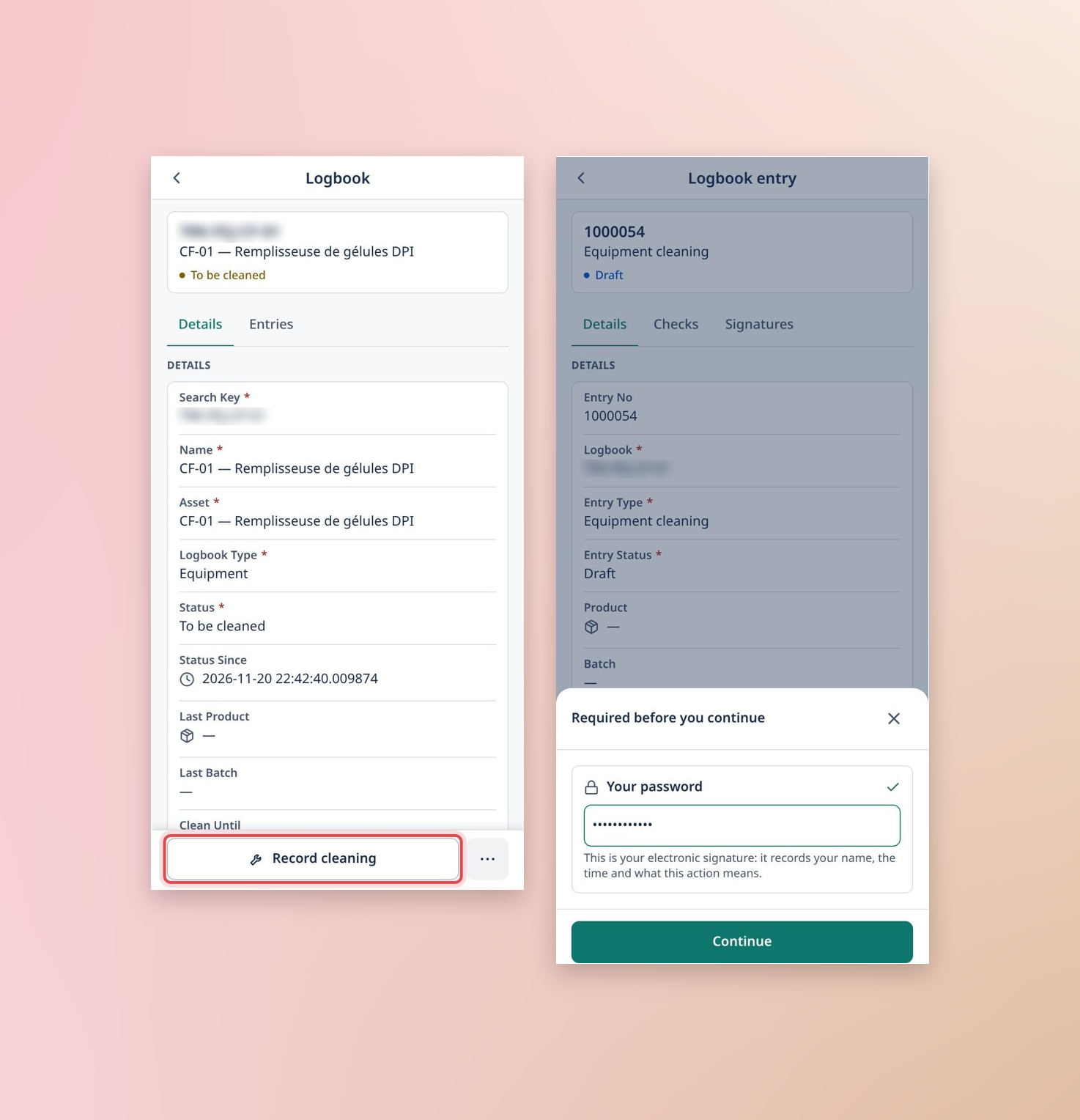
The status waits for QA. A cleaning that needs verification leaves the equipment To be cleaned until a second person verifies it on PiGo or the web. Only then is it Clean, with a clean hold time of 72 hours. The person who signed an entry cannot verify it.
The wrong next step is refused. Usage on a mixer that is still to be cleaned is refused with the reason. A packaging line that needs line clearance starts a batch only after it has been cleared for that batch; another batch is refused.
Out of limits goes back. A final rinse conductivity above its limit always needs a second person, whatever the entry type says. QA cannot accept it without a reason; QA can return it, and the operator rinses again and signs again. The return and its reason stay on the record.
A breakdown reaches maintenance. Reporting a breakdown puts the equipment Under maintenance and raises a corrective maintenance request in Pi MRO for that asset, linked to the entry. After the repair the technician records Maintenance done, and the equipment must be cleaned before it is used again.
Corrections, not alterations. A signed entry cannot be changed or deleted, by anyone. A wrong batch number is corrected by a new entry with the reason, verified by QA. The original stays visible, marked Corrected.
Hold times are watched. When a clean hold time passes, the equipment becomes Cleaning expired and usage is no longer offered.
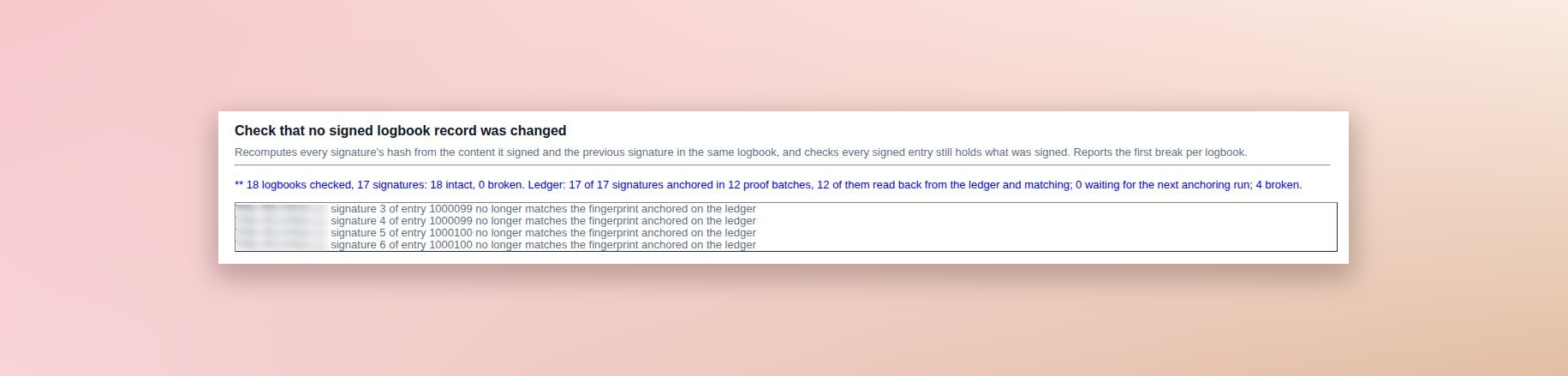
Records that show if they were changed. Each signature keeps the exact content it signed and a hash chained to the previous signature in the same logbook. A check recomputes the whole chain. When a signed reading is edited directly in the database, the check names the entry that no longer holds what was signed.
Anchored where no single administrator can reach. A hash chain shows a changed record, but whoever runs the database could rewrite a whole chain so that it checks out again. So every signature's fingerprint is also sealed into a batch and anchored on a Hyperledger Fabric ledger that a second organisation of your choosing co-signs. Only the fingerprint leaves the database: no names, no readings. The same check reads every batch back from that ledger. Rewrite a signed reading and recompute every hash after it, and the hash chain alone sees nothing; the ledger check names the signature.
Guessing a password does not work. Three wrong passwords within 15 minutes lock that person's signing for 15 minutes. Every attempt, successful or not, is kept for review.
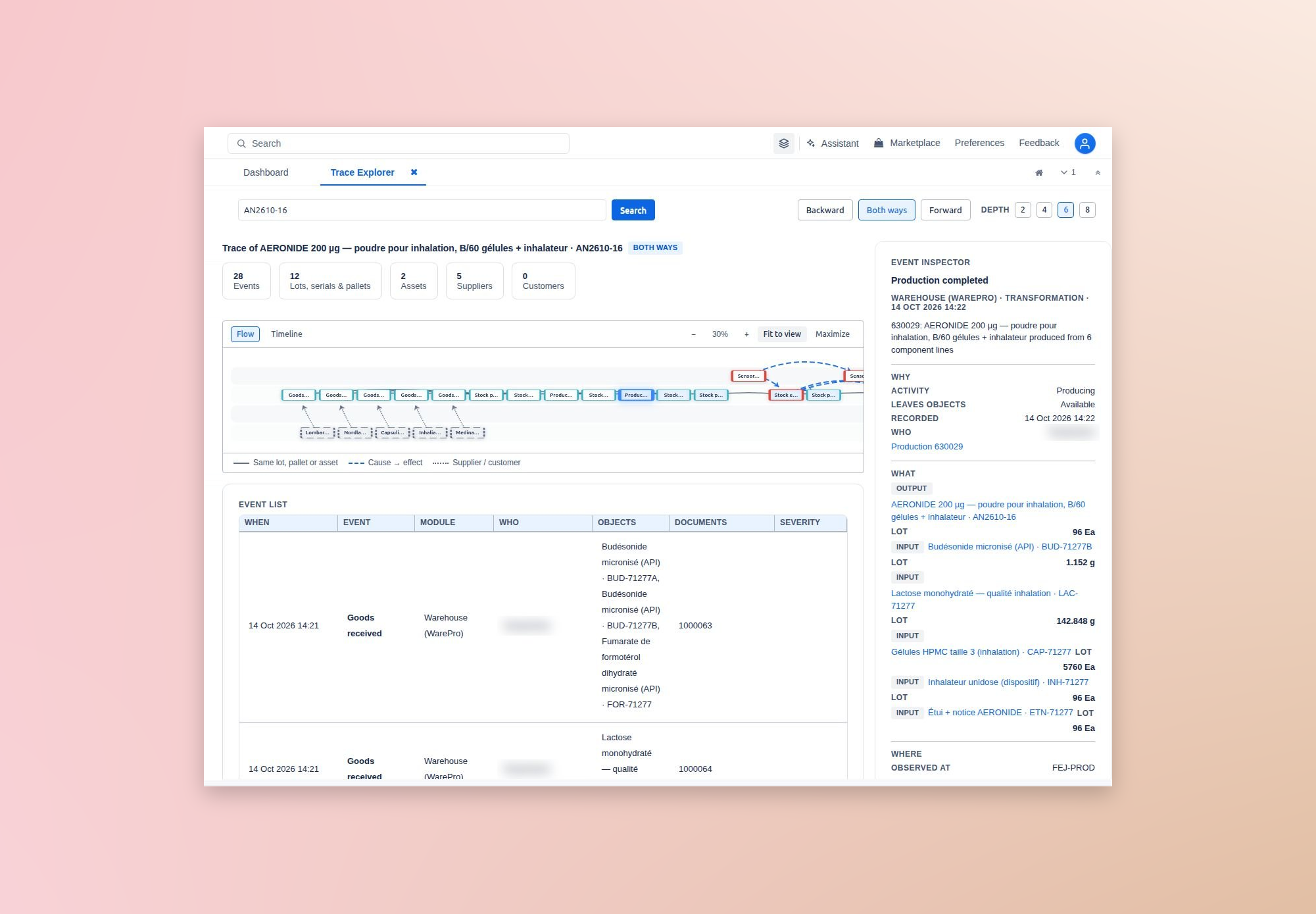
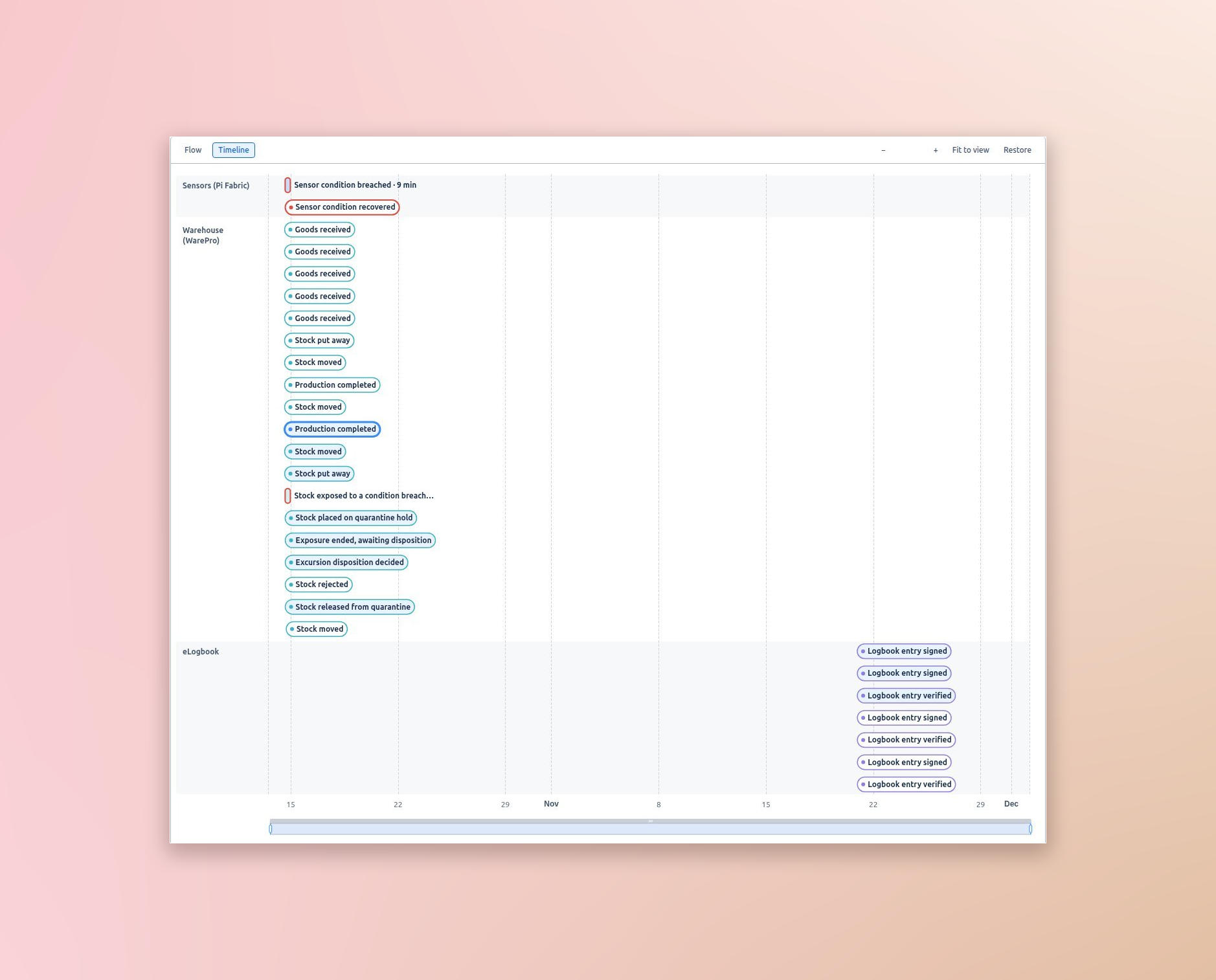
Every signature is an event in the platform ledger, about the asset and the batch. Search a batch in Trace Explorer and its whole story comes back: the materials received, the production, the stock moves, a room excursion and the quarantine that followed, and the logbook entries of the equipment it ran on.
On the timeline, each product has its own lane: sensors, warehouse and eLogbook, on one time axis. An investigator reads the batch's history without exporting anything.
The eLogbook is designed to support 21 CFR Part 11 and EU GMP Annex 11:
| Requirement | How the eLogbook supports it |
|---|---|
| Records protected, nothing obscured | Signed entries are read-only; corrections are new entries that point at the original |
| Audit trail | Every change logged; signature rows can only be added; every signature on the event ledger |
| Operational and authority checks | Status rules enforce the order of steps; roles decide who records and who verifies; the performer cannot verify |
| Signature manifestation | Printed name, date and time, and meaning on every signature |
| Signature linked to the record | Each signature holds a hash of what it signed, chained per logbook, and its fingerprint is anchored on a ledger a second organisation co-signs |
| Two components | The logged-in user ID plus the password, at every signature |
| Password controls | The platform's password policy, and signing locked after repeated failures |
Validation of the system in your environment, your SOPs and your training remain yours, as they do with any computerised system.
Where to start
The fastest first step is a logbook walk. We take one of your areas with your production and QA leads, list the logbooks it keeps today, and map each column and signature to entry types, checks and verifiers. You leave with your own eLogbook set-up on paper and an honest view of what changes on the floor.
If your equipment status still lives on a printed label and a bound book, we'd like to show you what one shift looks like on PiGo. Book a Session with the PIPRA team.